

How to Build a Complete Company Profile on Turkish Medical Index: 5 Steps
Buyers compare several suppliers before they write to one. A full profile gives them what they need to choose you.
A Thin Profile Gives a Buyer Nothing to Compare
A buyer who finds three Turkish suppliers of the same product will open all three pages. The one with a clear description, a product list, named certificates and a working website link is easy to shortlist. The one with a company name and a city is not. Everything below is information you already have: the task is to put it in the form once, and keep it current.
Show credibility
Certificates, GTIP codes and a catalogue link tell a buyer you are a real manufacturer or distributor.
Be specific
Product names and represented brands are what a buyer scans for.
Be reachable
A public e-mail, a phone number and a website give a buyer more than one way to contact you.
Filling In Edit Your Listing
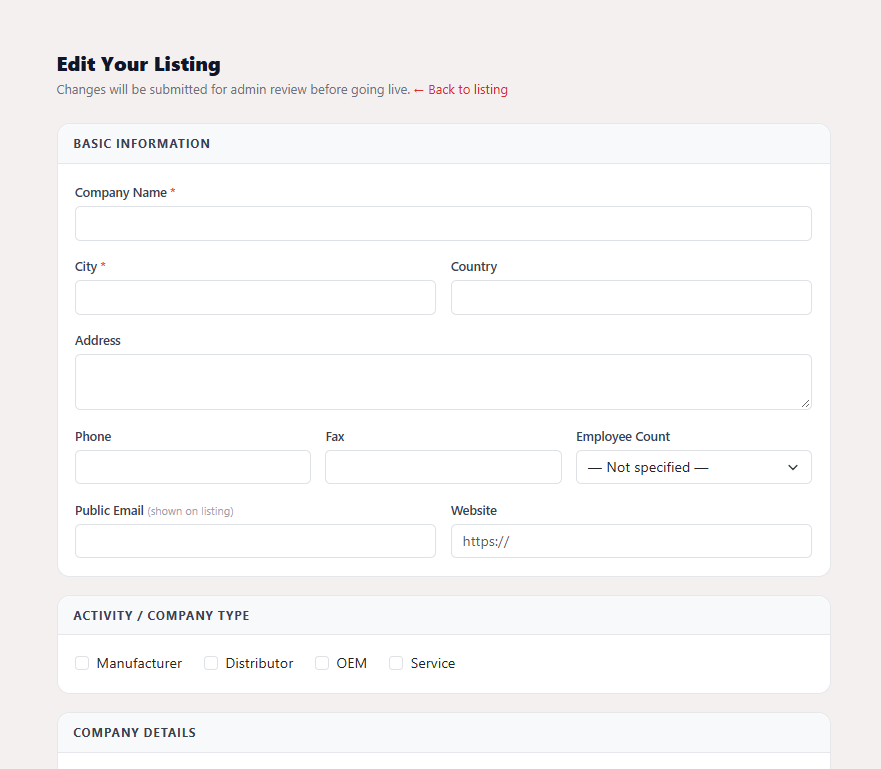
Log in with the account that owns the listing and open your company page. In the right-hand panel under Your Listing you will find Edit Your Listing; the same page opens from Edit Listing in the My Listing dashboard. If your company is not listed yet, list it for free first, or search the directory and claim an existing listing.
Basic Information
Two fields are required: Company Name and City. Then complete Country, Address, Phone, Fax and Website, and choose your size from the Employee Count list (from 1-10 up to 500+). The Public Email field is the address shown on your listing, so use one that someone reads every day, such as a shared sales mailbox rather than one person's inbox.
Activity / Company Type
Tick every box that describes you: Manufacturer, Distributor, OEM or Service. Buyers use this to separate companies that make a product from those that only sell it, so tick what is true and nothing more.
Company Details
This section carries most of the weight. Write the Company Profile as a buyer would want to read it: what you make or supply, how long you have done it, the markets you already serve. List your lines in Products / Services and, if you distribute, your Represented Brands. Name your standards and approvals under Certificates (for example ISO 13485 or CE marking, if you hold them), add your customs tariff numbers under GTIP Codes, and list the Languages your team can work in.
Social & Media Links
Optional, but each link lets a buyer check you out further: LinkedIn, Facebook, Instagram, X / Twitter, a Company Video (YouTube URL) and a Catalogue URL. A link to a current product catalogue is probably the most useful of the six. Check each one opens before you submit.
Logo and submit
Under Logo, upload a JPG, PNG, GIF or WebP file of up to 2 MB; leave it blank to keep the current logo. Then press Submit for Review. The site confirms that your changes have been submitted and are awaiting admin approval, and the listing is updated once the team has reviewed them.
Writing for the Buyer, Not for Yourself
Do
- Say what you make in the first sentence of the profile
- Use the product names a buyer would search for
- Name certificates exactly as they appear on your documents
- Use a company e-mail that is monitored
- Re-read the page once a quarter and update it
Avoid
- Listing a certificate you do not hold or that has expired
- Pasting the same text into every field
- Leaving a dead website or catalogue link
- Submitting several small edits one after another
- Describing yourself only with adjectives such as "leading" or "best"
Changes Are Reviewed Before They Appear
Edits do not go live the moment you submit them. They are held for review by the TMI team, and only one set of changes can wait at a time. While one is pending, the edit page shows a notice and the form is disabled until the review is complete. So prepare everything first and submit once, rather than saving a field at a time. The form itself says so at the top: Changes will be submitted for admin review before going live.
Give buyers a profile worth shortlisting
Open your company page, press Edit Your Listing and work through the five sections. Registration is free and required.
Open My Listing Create your free account